Display remote Node.JS service logs on Chrome Console
/ 1 min read
In recent years, we got plenty of PaaS services which provide very simple and easy way to deploy our Node.JS services.
Usually after deploying my service, I have to use the command line tools or visit some very slow web pages to access the server logs. It’s really waste my time.
But today, I want to introduce a tool, Chrome Logger, it provides a way to display server logs into Chrome Developer Tool’s Console.
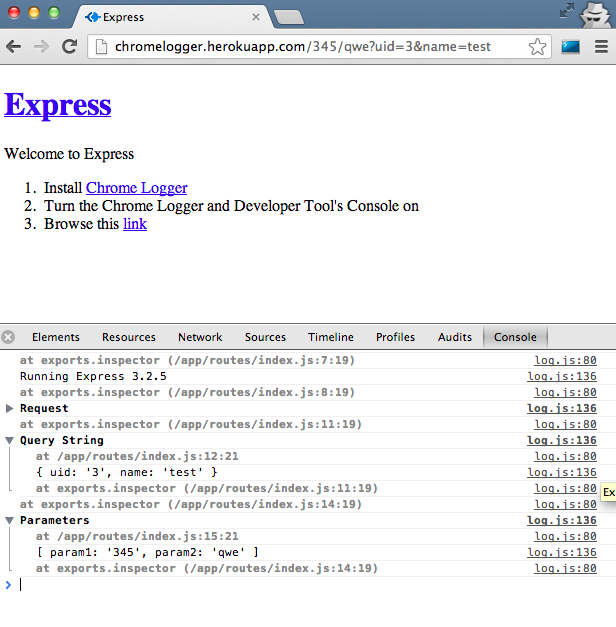
Install it, then visit my sample project on Heroku to see what’s going on.
- Sample Test Project on Github
Update 06/25 00:40:
- If you’re using ExpressJS, you can simple log your error like following error handling middleware
Update 06/25 01:50:
- After reading the Secret of Browser Developer Tool. I updated ChromeLogger(my forked repo) and express-chrome-logger(my forked repo). Now it supports TABLE display
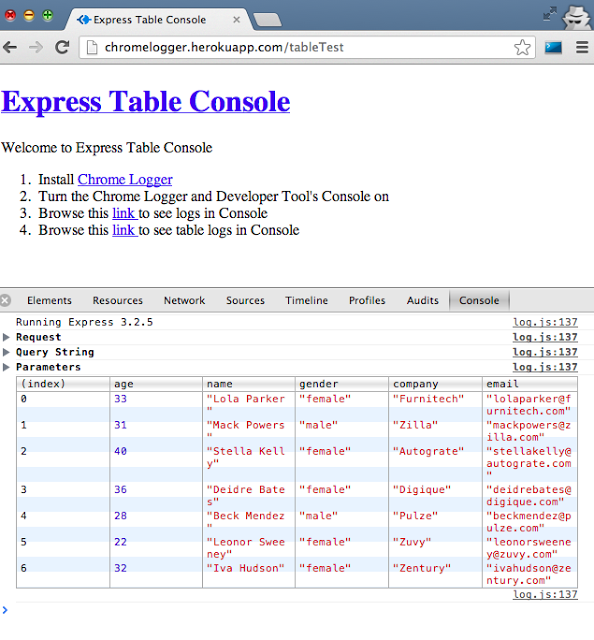
Pull requests sent : chromelogger & express-chrome-logger.
Good luck to myself.